Showing posts with label DWDEP Regular Embossing Paste. Show all posts

Monday, April 17, 2017

Signs of Spring!


Welcome to our Stampendous and Creative Impressions Blog Hop!  This week the Stampendous Design Team will be sharing our creations that feature some of the wonderful ribbons and embellishments that Creative Impressions has generously provided us. They are the perfect finishing touches to our designs. And what's a Blog Hop without some PRIZES!


Today I am sharing a card showing the beautiful Dreamweaver Scallop Butterfly (DWLM255) and the lushious Lavender Velvet Shimmer ribbon from Creative Impressions.


Supplies:

Stampendous:

Dreamweaver:
DWLM255 Scallop Butterfly Stencil
DWDEP Regular Embossing Paste
DWDPK Dreamweaver Palette Knife
DWLM2010 Paste Spreader
MetallicFX Mica Powders - DWFX05, DWFX10, DWFX14

Plus:
My Color Cardstock - Plum, Spanish Moss
Cream Cardstock
Graphic45 March Flourish 4501034
Creative Impressions Lavender Velvet Shimmer 70978
Copic Marker BV02, BV04
Soft Paint Brush
Beacon Adhesive FabriTac
Removable Tape
Foam Tape
Swiffer cloth

Instructions:
Step 1:  Fold a 5" x 10" piece of Plum cardstock in half to form an A76 card
Step 2: Tape the Scallop Butterfly stencil to a 2 1/4" x 3 1/4" piece of  cream cardstock with removable tape
Step 3: Use a palette knife and paste spreader to apply Regular Embossing Paste over the design, remove stencil and place in water for cleaning later, let paste dry about 8 - 10 minutes
Step 4:  Use a soft paint brush to gently brush the MetallicFX powders on the paste, do not try to brush off extra powders now, let paste dry completely
Step 5:  Use a small piece of Swiffer cloth to brush away any extra powder from the image and background, use the Copic markers to add a little shading
Step 6: Adhere a 4 3/4" x 6 3/4" piece of the Graphic 45 paper to the card front
Step 7:  Adhere a 2 1/2" x 3 1/4" piece of Plum cardstock to a 2 3/4" x  3/4" piece of Spanish Moss cardstock, adhere both to the upper right side of the card
Step 8:  Use foam tape to apply the Scallop Butterfly to the double mat
Step 9:  Use FabriTac to add the purple glittered ribbon near the bottom edge of the card

Stop over at the Stampendous Blog for a complete list of today's designers.

Happy Creating,
Louise

Friday, March 31, 2017

Whale of a Time!

Stampendous is excited about the release of their new April 2017 Catalog products for Summer! There are terrific new stamp images from Fran Seiford, Laurel Burch, Pink Your Life's Nicoletta Zanella, and House-Mouse Designs' Ellen Jareckie! These stamps are now shipping to wholesale customers who are busily stocking their stores for you. Friday, April 1st you can order these images on the Stampendous website. Remember that Stampendous website orders are shipped to you from a local, independent retailer when they have them in stock.

Here's a sneak peak of the gorgeous new Stylized Whale stamp, P302, paired with the perfect new sentiment Whale of a Time, L270. Of course, the Waves Stencil, DWLJ838, gives a great finishing touch to them!


Stampendous:
CRP302 Cling Stylized Whale
CRL270 Cling Whale of a Time
MPW811 Mixed Media White Paper
Acrylic Handle
MEM01 Memento™ Tuxedo Black Ink by Tsukineko®
GL220U Crystal Multi Glitter

Dreamweaver:
DWLJ838 Waves Stencil
DWDEP Regular Embossing Paste
DWDPK Dreamweaver Palette Knife
DWLM2010 Paste Spreader

Plus:
My Color Cardstock - Seafoam, Plum
Copic Markers - BG10, BG13, BG18, BV00, BV02, BV04, R30, R32, R35, T0, T2, T4
Removable Tape
Foam Tape

Instructions:
Step 1:  Fold a 6" x 9 1/2" piece of Plum cardstock in half to form an A6 card
Step 2: Tape the Waves stencil to a 4 1/4" x 5 1/2" piece of Seafoam cardstock with removable tape
Step 3: Use a palette knife and paste spreader to apply Regular Embossing Paste to the Waves design, remove stencil and place in water, sprinkle the wet paste with Crystal glitter, tap off extra, let paste dry, clean the stencil
Step 4:  Stamp the Stylized Whale on white cardstock, color with Copic Markers, trim close to the design on all four sides, mat on Seafoam and Plum cardstocks
Step 5:   Stamp the sentiment on white cardstock and trim close to the design, mat on Seafoam and Plum cardstocks
Step 6: When the pasted image is dry, adhere the Waves to the card front
Step 7:  Adhere the Stylized Whale on the Waves
Step 8:  Use foam tape to apply the sentiment to the card front

Stop over at the Stampendous Blog for a list today's designers.

Stampendous Blog

Happy Creating,
Louise

Friday, March 10, 2017

Creamy Birthday Cupcake!

We've been having a Superstar Birthday celebration on the Stampendous Design Team this week! That means we have been sharing ideas using some of our awesome stamps and stencils to create birthday projects!

The FMS4072 Creamy Cupcake Metal Stencil on a stenciled background using the FMS4074 Batik Metal Stencil and a simple Happy Birthday sentiment from the SSC1115 Birthday Assortment set on the Fitted Frames all combined in a monochromatic scheme create a sweet birthday greeting!


Stampendous:
FMS4072 Creamy Cupcake Metal Stencil
FMS4074 Batik Metal Stencil
SSC1115 Birthday Wish Perfectly Clear Stamps
DCP1006 Fitted Frames Set B
MPW811 Mixed Media White Paper
GL220U Crystal Multi Glitter

Dreamweaver:
DWDEP Regular Embossing Paste
DWDPK Dreamweaver Palette Knife
DWLM2010 Paste Spreader
DWLL332 Picasso Stencil
DWNHB12 1/2" Brush #12 Natural Handle

Plus:
My Color Cardstock - Pink Delight, Pimento, Coral Rose
Memento Ink - Rose Bud, Lady Bug
Dries Clear Glue
Removable Tape
Die Cut Machine
Foam Tape

Instructions:
Step 1:  Fold a 6" x 9 1/2" piece of Coral Rose cardstock in half to form an A6 card
Step 2: Tape the Creamy Cupcake stencil to a 3 1/2" x 4 1/2" piece of  Pink Delight cardstock with removable tape
Step 3: Use a palette knife and paste spreader to apply Regular Embossing Paste to the Creamy Cupcake design, remove stencil, let paste dry
Step 4:  When the paste is dry, use the stencil brush to add color to the "cupcake wrapper" part of the design, using the picasso tool to keep color off the "frosting", use a small paint brush to apply glue to the frosting then sprinkle with Crystal glitter
Step 5:   Tape the Batik stencil to a 4 1/4" x 5 1/2" piece of white with removable tape, use the stencil brush to add color over the design
Step 6: Adhere the Batik to a 4 3/8" x 5 5/8" piece of Pimento then to the card front
Step 7:  Adhere the Creamy Cupcake to a 3 5/8" x 4 5/8" piece of Pimento then to the Batik layer
Step 8:  Stamp the Happy Birthday image on white paper, use the Fitted Frames to die cut the Happy Birthday and a matching frame from a piece of Pimento
Step 9:  Use foam tape to apply the Happy Birthday to the card front

Today's designers are listed on the

Stampendous Blog

Happy Creating,
Louise

Thursday, September 15, 2016

Layered Birthday Wishes!

Welcome to this week's blog hop! The Stampendous Design Team was provided some great tools from the folks at Perfect Paper Crafting to use with our beautiful Stampendous products to create LOTS of wonderful ideas for you!

Tools For Crafting with Stampendous and Perfect Paper Crafting


Today I'm sharing a  card I designed for the July catalog. It pair the Dreamweaver Cardinal Stencil with one of Dreamweaver's Happy Birthday stencils. But wait, this doesn't look like a Cardinal! By using blue tones instead of reds, you can change the whole look of this stencil. I think he looks pretty good as a Blue Jay too!


Of course, if we are having a Blog Hop there must be Prizes!

Prizes
stm_pcp_prize_bow
There will be 3 prize packages available during our hop! Each winner will have the chance to win one of the following prize packages, a Perfect Ruler and Pop-Up Die Set combo package, a Mini-Perfect Layers and Pop’cessories Die Set combo package, or a Perfect Airbrush, 1 – Holly Pattern Stencil and 1 –Holly Scroll Stencil combo package. US winners only, see Official Contest Rules for details.
Stampendous:
MMW811 Mixed Media White Paper

Dreamweaver:
DWLM110 Cardinal Stencil
DWLM150 Happy Birthday Small Stencil
DWLL332 Picasso Stencil
DWDEP Regular Embossing Paste
DWDPK Dreamweaver Palette Knife
DWLM2010 Paste Spreader
DWBHB-3 1/8" Brush #3 Blue Handle
DWGHB-6 1/4" Brush #6 Gold Handle
DWNHB-12 1/2" Brush #12 Natural Handle

Plus:
My Colors Cardstock - Winter Lake, Ocean Side
Memento Inks - Bahama Blue, Danube Blue, Rose Bud, Bamboo Leaves, Rich Cocoa
Brilliance Inks - Sunflower Yellow
Mini Perfect Layers
Foam Tape
Removable tape

Instructions:
Step 1:  Fold a 6" x 9 1/2" piece of Winter Lake cardstock in half to form an A6 card
Step 2: Tape the Cardinal stencil to a 2 1/4" x 3 1/4" piece of white cardstock and Happy Birthday to a 1 1/4" x 4" piece of white cardstock with removable tape
Step 3:  Use a palette knife and paste spreader to apply a coat of Regular embossing paste over the Cardinal, remove stencil and place in water for cleaning, let paste dry
Step 4:  Use  a 1/2" stencil brush to apply Bahama Blue ink to the Happy Birthday, add Danube Blue to the lower part of all the letters, remove stencil and place in water for cleaning
Step 5:  Place the clean, dry Cardinal stencil over the dry pasted image and use stencil brushes and the Picasso tool to apply color, remove stencil and place in water for cleaning
Step 6: Adhere the Cardinal to a mat of Winter Lake, use the Mini Perfect Layer tool to trim a 1/8" edge all around, adhere to a mat of Ocean Side, trim, then to a mat of white, trim, adhere to the upper left side of  the card front
Step 7:  Adhere the Happy Birthday to a mat of Winter Lake, then a mat of Ocean Side using the Mini Perfect Layer tool on each layer
Step 8: Use foam tape to add the Happy Birthday to the card front

Check out more great ideas:

Louise Healy


Happy Creating,
Louise

Friday, July 29, 2016

Leaf Texture Embellishments!

As promised yesterday, here are the instructions for creating some Fresh Fall Fun embellishments using the Dreamweaver Leaf Texture Stencil (DWLG616) and Regular Embossing Paste!
Leaf Texture Embellishments!
Stampendous:

Dreamweaver:
DWLG616 Leaf Texture Stencil
DWDEP Regular Embossing Paste
DWDPK Dreamweaver Palette Knife
DWLM2010 Paste Spreader
DWGHB-6 1/4" Brush #6 Gold Handle

Plus:
Freezer Paper
Brilliance Inks - Sunflower Yellow, P. Orange, Rocket Red, P. Rust, P. Olive, P. Thyme
Copic Marker E47
Removable tape

Instructions:
Step 1:  Tape the Leaf Texture stencil to the shiny side of a sheet of Freezer Paper

Step 2:  Use a palette knife and paste spreader to apply Regular Embossing Paste over  the design, remove stencil, place stencil on a clean part of the paper and apply paste again, repeat until you fill the paper or the images don't come out clean anymore, let paste dry

Step 3:  Place the clean, dry stencil back over the dry paste, use 1/4" stencil brushes to rouge colors on the designs, remove the stencil, clean and dry it 

Step 4:  Use the brush tip of the E47 marker to run around the edges of the leaves to give them a more finished look

Step 5: Slowly peel off the leaves you want, you have to be a little careful at this point, they can tear easily

Step 6: Use glue to add them as embellishments to cards or page layouts

We hope you've enjoyed our week of Fresh Fall Fun! Here are today's designers:

Louise Healy

Happy Creating,
Louise

Thursday, July 28, 2016

Fresh Fall Fun!

Fresh Fall Fun is this week's theme for the Stampendous Design Team. I don't know why I associate Scarecrows with Fall, but I do! (Really, they go up in the spring!) It's probably because St. Charles, IL (where we had our store) has a Scarecrow festival every Fall. At any rate, Fall and Scarecrows go hand in hand in my book.

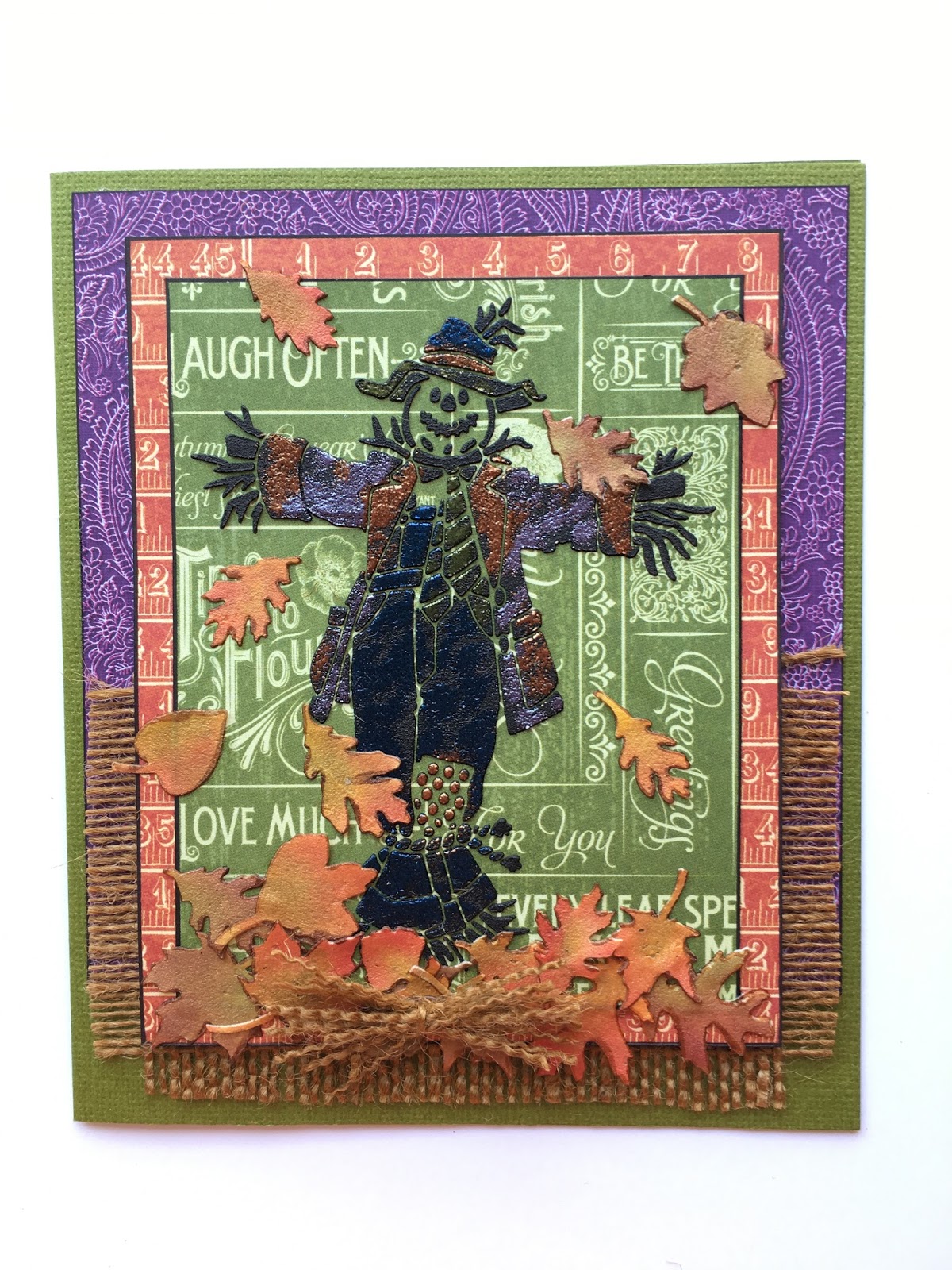
Today is Thursday, which means team members share ideas using stencils. Today I'm sharing a fun card using the Dreamweaver Scarecrow stencil, DWLG686.  Check back tomorrow to see how I created the leaf embellishments!


Supplies:


Stampendous:
PK03 Gemstone Embossing Kit
EPA50 HT400 Embossing Tool

Dreamweaver:
DWLG686 Scarecrow Stencil
DWLG616 Leaf Texture Stencil
DWDMBP Matte Black Embossing Paste
DWDPK Dreamweaver Palette Knife
DWLM2010 Paste Spreader

Plus:
My Color Cardstock - Spanish Moss
Graphic 45 November Flourish 4501050
Graphic 45 Charmed I'm Sure 4501143
Graphic 45 Brews and Potions 4501144
Brown Burlap
Copic Marker 100
Removable Tape
Foam Tape
Scotch Quick Dry Adhesive

Instructions:
Step 1:  Fold a 6" x 10" piece of Spanish Moss cardstock in half to form side fold, 5" x 6" card (fits in an A7 envelope)
Step 2: Cut a 4 3/4" x 5" piece of the Brews and Potions paper (purple side), edge with 100, adhere to the card front near the top
Step 3: Cut a 2 3/4" x 4 3/4" piece of the brown burlap, fray the edges, adhere to the card front under the top paper
Step 4: Cut a 3 3/4" x 4 3/4" piece of the Charmed I'm Sure paper, edge with 100
Step 5:  Tape the Scarecrow stencil to a 3 1/2" x 4 1/2" piece of November Flourish paper (green side) with removable tape
Step 6:  Use a palette knife and paste spreader to apply Matte Black Embossing Paste over the design, remove stencil and place in water for cleaning later, let paste dry
Step 7: When the paste is dry, place the clean, dry Scarecrow stencil back over paste and use a finger dabber to apply VersaMark to the parts of the image where the "clothes" are, remove stencil, sprinkle various colors of embossing powder where desired, tap off extra, heat set, edge with the 100 marker
Step 8: Adhere the Scarecrow to the Charmed I'm Sure layer
Step 9:  Use foam tape to add the Scarecrow to the card
Step 10:  Use the Quick Dry to add some small pasted leaf embellishments (see separate instructions for DWLG616 Leaf Texture in tomorrow's post!) and a small bundle of the burlap tied together to finish the card

For more Fresh Fall Fun see:
Louise Healy

Happy Creating,
Louise

Wednesday, June 8, 2016

Light the Way!

This week the Stampendous Design Team is showcasing the beautiful new stencils that were released in April. Today I am sharing the Lighthouse Metal Stencil (FMS4019) paired with the Voyage Under the Sea collection from Graphic45.  It makes a wonderful card for all the sea lovers you know!

"Light the Way"

Stampendous:
FMS4019 Lighthouse Stencil
FRC05 Taupe Color Fragments

Dreamweaver:
DWDEP Regular Embossing Paste
DWDPK Palette Knife
DWLM2010 Paste Spreader

Plus:
My Colors Cardstock - Spearmint
DCWV Turquoise and Plain Cork Paper
Graphic 45 Cardstock Deep Blue Dreams 4501324
Copic Marker BG18
ZipDry
Scotch Quick Dry Adhesive
Jute
Removable tape

Instructions:
Step 1:  Fold a 7" x 10" piece of Spearmint cardstock in half to form an A7 card
Step 2:  Cut a 4" x 4 3/4" piece of the turquoise cork paper
Step 3: Tape the Lighthouse stencil to the cork paper with removable tape 
Step 4:  Use a palette knife and paste spreader to apply a coat of Regular Embossing Paste over the image, remove the stencil and place in water for cleaning, let paste dry
Step 5:  Cut a 4" x 4 1/2" piece of the Graphic45 paper, edge with BG18 marker and adhere near the top of the card front
Step 6: Cut a 2" x 4 1/2" piece of plain cork and use ZipDry to adhere it under the Graphic45 paper
Step 7: When the paste is dry, carefully tear away some of the turquoise cork from the top and two sides of the Lighthouse image, use ZipDry to adhere it to the card front
Step 8:  Cut a 1 1/2" x 4 1/2" piece of plain cork and tear along one long edge, adhere under the Lighthouse using ZipDry
Step 9:  Use ZipDry to add one of the small strips of turquoise cork that got torn off an edge and add it to the bottom of the cork layers
Step 10: Randomly place some spots of Quick Dry Adhesive on the cork and sprinkle with bits of Taupe Color Fragments
Step 11:  Make a sailor's knot with Jute and attach to the card with ZipDry

For more samples see the Stampendous Blog!
Happy Creating,
Louise

Thursday, June 2, 2016

Beach Basics

The Stampendous Design Team has more great summertime ideas for you this week. This time we are sharing samples made using the Beach Embossing Kit, EK22, from Stampendous!


Stampendous:
MPW811 Mixed Media White Paper
EK22 Beach Embossing Kit - Golden Sand
FREG020 Deep Impressions Chunky Embossing Enamel
SSC1170 Soaring Sentiments Perfectly Clear Stamp Set
DCP1005 Fitted Frames A Cutting Die Set Size E
MEM01 Memento™ Tuxedo Black Ink by Tsukineko®
Acrylic Handle
HT400 Embossing Heat Tool

Dreamweaver:

DWLJ811 Jumbo Tile Stencil
DWLL379 Tall Palm Trees Stencil
DWLL3033 Sandcastle Stencil
DWLM209 Starfish Stencil
DWLL332 Picasso Stencil
DWGHB-6 1/4" Brush #6 Gold Handle
DWHNB-12 1/2" Brush #12 Natural Handle
DWDEP Regular Embossing Paste
DWDPK Palette Knife

Plus:
My Colors Cardstock - Poolside, Sandy Beach, Sweet Potato
VersaMark
Brilliance Inks - Sunflower yellow, Rocket Red, P Thyme, P Olive, P Beige, P Chocolate
Memento Inks - Bahama Blue
May Arts Ribbon
Finger dabber
Die Cut Machine
Rubber Embossing Mat
Removable tape
Craft Glue Dots

Instructions:
Step 1:  Fold a 7" x 10" piece of Poolside cardstock in half to form an A7 card
Step 2:  Dry emboss the Jumbo Tile stencil (DWLJ811) on white cardstock 4 1/4" x 5 1/2"
Step 3: With the grid stencil still in place, overlay the Sandcastle stencil and tape in place with removable tape
Step 4:  Use a 1/4" stencil brush  to apply ink to the design, use the Picasso tool to help with the placement of colors, remove the Sandcastle stencil only
Step 5: With the grid stencil still in place, overlay the Tall Palm Trees stencil along the left edge and tape in place with removable tape
Step 6:  Use a 1/4" stencil brush  to apply ink to the design, use the Picasso tool to help with the placement of colors, remove the Tall Palm Trees stencil only
Step 7:  With the grid stencil still in place, use a 1/2" stencil brush, blue ink and the Picasso to add some "clouds" to the  "sky", add more blue along the horizon to look like the ocean, use the 1/4" brush from the browns of the Sandcastle to brush more brown around the bottom edge for the "beach" 
Step 8:  Remove the grid stencil and wipe it off with a soft rag and return to the design, use a finger dauber to apply a coat of VersaMark over the entire grid, remove stencil, set aside 
Step 9: Sprinkle with Deep Impressions embossing powder, heat set, cool
Step 10: Put the grid back on and repeat the VersaMark, sprinkle with Deep Impressions embossing enamel in the "sky" and Golden Sand Embossing Powder on the "beach", heat, repeat if needed to get a smooth tile-like finish
Step 11:  Trim an even edge all around the image, mount on a Sandy Beach mat, then to the card front
Step 12:  Stamp the "Catch a breeze..." saying on white cardstock with black ink, die cut with size E frame from Fitted Frames Set A, cut the matching mat from Sandy Beach
Step 13:  Use a 1/2" stencil brush, blue ink and the Picasso to add a "cloud" over the saying and around the edges, adhere to the card front with foam squares
Step 14:  Tape the Starfish stencil to Sweet Potato cardstock with removable tape, use a Palette Knife to apply Regular Embossing Paste over the design, remove stencil, tape back down on another part of the paper and apply paste, remove stencil and place in water for cleaning
Step 15:  Sprinkle the wet paste with Golden Sand Embossing Powder, tap off extra, heat set, cool, cut out the two Starfish, brush a little P Beige ink on the orange areas, adhere to the card with Craft Glue Dots

Here's today's list of designers:


Happy Creating,
Louise


Thursday, February 11, 2016

Embossing Dreamweaver Style!

This week the Stampendous team has been featuring techniques from the new Embossing Powder Techniques from A to Z by Fran Seiford, the founder and owner of Stampendous!
The book is filled with lots of pictures and helpful tips to make any embossing project easy!


To celebrate the release of Fran's new book, three lucky people will win their very own copy!


Today I am featuring one of the embossing techniques we use with stencils.


This card features the Daisies Stencil (DWLL548) using Technique P - Molten Magic. You can learn how to do this on pages 38-39 of  Embossing Powder Techniques from A to Z . The only difference is I used Regular Embossing Paste and the Summer Shine Embossing Kit powders (EK21) 
- Clear Lime, Clear Lemon, Clear Pink. The words stamped in the background of the various layers are from the newly released Floral Charms Perfectly Clear Set (SSC1243) by Stampendous.

Stampendous now carries an Embossing Heat Tool (HT400). Our heat tool by Wagner Tool is made by Milwaukee and is a heavy duty, long lasting, durable heat tool with more power and precision than the kind you can buy in the big box stores.


Here's the list of designers posting more techniques from the book today:


Jamie Martin (DW and Embossing)

Laura Drahozal (DW and Embossing)
Pam Hornschu (DW and Embossing)
Louise Healy (DW and Embossing)

Happy Creating,
Louise